Data Visualisation & Predictive Analytics Dashboard
Unifying exploratory data analysis and real-time regression: An interactive Streamlit dashboard featuring 6 multidimensional Plotly charts and an embedded Random Forest Regressor predicting socio-economic event likelihood.
01. The Real Problem
Analyzing global socio-economic, environmental, and PESTLE (Political, Economic, Social, Technological, Legal, Environmental) event streams typically requires juggling separate tools for data munging, static reporting, and statistical modeling. When decision-makers explore complex indicators like intensity, relevance, and likelihood, static tables fail to convey correlations or allow speculative 'what-if' forecasting.
The goal of this project was to build a unified exploratory analytics workspace in Python that combines high-performance multi-variable filtering, dynamic charting, and real-time regression forecasting in a single accessible web interface.
02. Data Processing & Feature Pipeline
In tt.py, raw data from jsondata.json is ingested and prepared with robust cleaning steps:
# Handle missing values and adjust data types
df['end_year'] = pd.to_numeric(df['end_year'], errors='coerce').fillna(0).astype(int)
df['intensity'] = pd.to_numeric(df['intensity'], errors='coerce').fillna(0)
df['relevance'] = pd.to_numeric(df['relevance'], errors='coerce').fillna(0)
df['likelihood'] = pd.to_numeric(df['likelihood'], errors='coerce').fillna(0)
for col in ['topic', 'sector', 'region', 'pestle', 'source', 'country']:
    df[col] = df[col].fillna('Unknown')

# Encode categorical variables for the ML model
label_encoders = {}
for column in ['topic', 'sector', 'region', 'pestle', 'source', 'country']:
    le = LabelEncoder()
    df[column + '_encoded'] = le.fit_transform(df[column].astype(str))
    label_encoders[column] = le
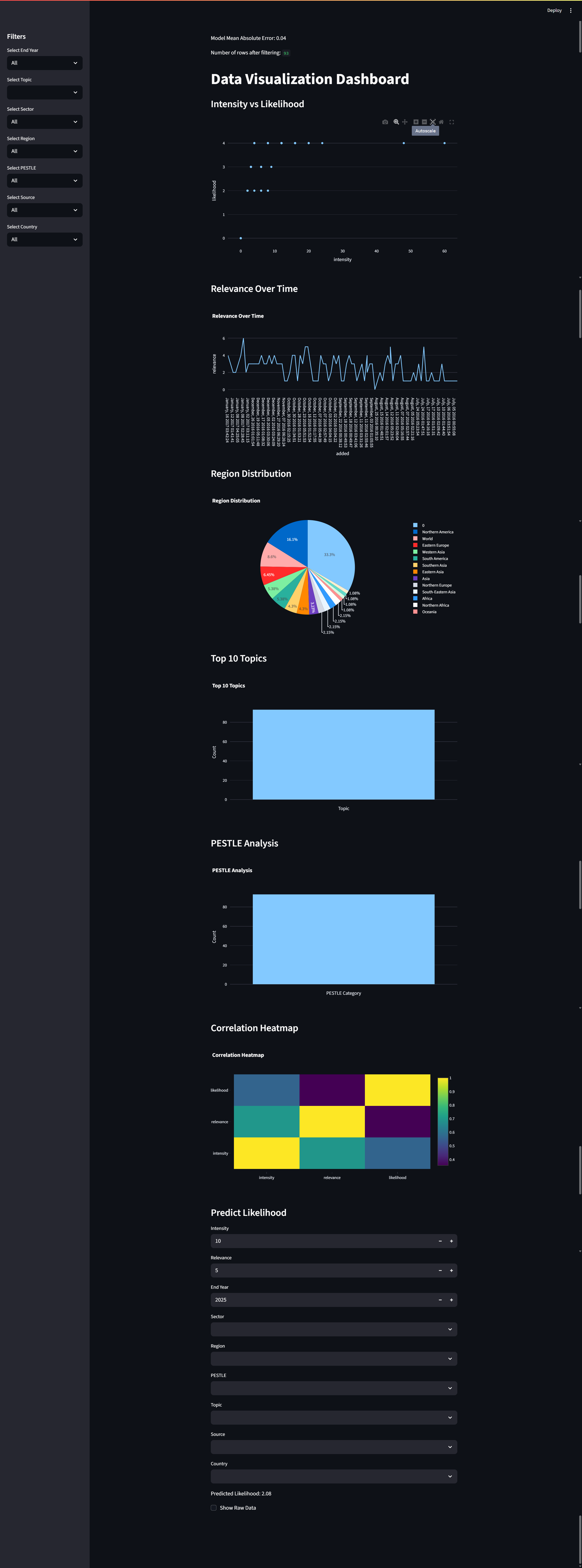
Seven sidebar dropdowns allow visitors to slice the dataset dynamically across End Year, Topic, Sector, Region, PESTLE, Source, and Country, with instantaneous chart rerendering.
03. 6 Verified Interactive Visualizations
The dashboard implements 6 distinct Plotly visualizations designed for deep analytical exploration:
| Visualization | Plotly Engine | Analytical Objective |
|---|---|---|
| Intensity vs. Likelihood | px.scatter |
Examines clustering and outliers between event severity and probability, color-coded by topic with tooltip title inspection. |
| Relevance Over Time | px.line |
Tracks temporal trajectory of strategic importance across distinct industry domains. |
| Region Distribution | px.pie |
Aggregates geographic density and event volume across continental markets. |
| Top 10 Topics | px.bar |
Identifies highest-frequency risk and opportunity categories via nlargest(10) aggregation. |
| PESTLE Analysis | px.bar |
Decomposes macro-environmental influences into structural categories. |
| Correlation Heatmap | go.Heatmap (Viridis) |
Visualizes statistical covariance between numeric indicators (intensity, relevance, likelihood). |
04. Random Forest Predictive Engine
Beyond retrospective charting, the application embeds a trained regression model to forecast the likelihood score of unseen events:
- Model Architecture:
RandomForestRegressor(n_estimators=100, random_state=42)trained on an 80/20 train/test split. - Evaluation Metric: Mean Absolute Error (MAE) evaluated on the held-out test split and displayed transparently to the user.
- Interactive Forecasting Form: Visitors adjust numeric sliders (Intensity, Relevance, Target Year) and categorical dropdowns (Sector, Region, PESTLE, Topic, Source, Country). The inputs are mapped through the fitted
label_encodersand submitted tomodel.predict([encoded_values]), outputting the forecasted likelihood instantly.
05. Engineering Decisions & Optimization Scope
Verified Findings & Future Scope
- In-Memory Training: The Random Forest model is trained on startup when Streamlit initializes. For rapid iteration on small datasets (~thousands of rows) this works seamlessly; for enterprise scaling, the model pipeline would be pre-serialized to a Joblib/ONNX artifact.
- Streamlit Caching: Uses
@st.cache_datato cache raw JSON ingestion, avoiding repetitive disk I/O on filter updates. - Defensive Parsing: Handles infinite and empty values via
replace([np.inf, -np.inf, ''], np.nan).dropna()to safeguard matrix operations.